![Logo Negativo-4.png]](https://help.ifreturns.com/hs-fs/hubfs/Logo%20Negativo-4.png?height=40&name=Logo%20Negativo-4.png)
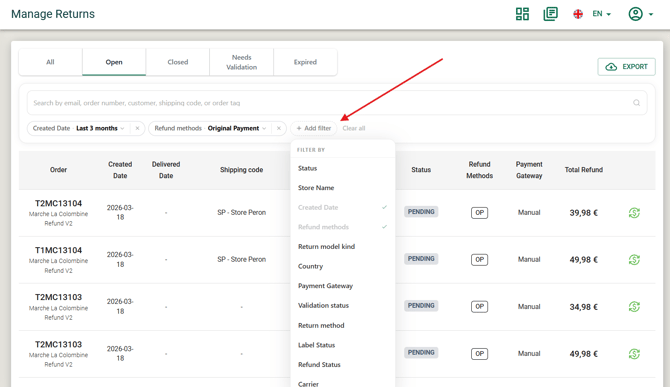
Simplified Filters — Return Tracking, Manage Returns & Manage Transportation
What's Changed:
-
The filter panel across three key sections of Portal has been redesigned with a cleaner, more intuitive layout — consistent with the filtering experience already introduced in other parts of the platform.
-
The previous multi-dropdown layout has been replaced by a simplified filter component that's easier to scan and faster to use.
What's New:
-
New filter field: Store Name You can now filter returns by store name directly from the filter panel in Manage Returns and Return Tracking pages
What's Preserved:
-
All existing filter capabilities are fully retained:
-
The global search bar continues to support lookups by Order #, Email, Customer name, Shipping code, Phone, and Postal code.
-
Filter logic, results, and performance are unchanged.
ECL (Label Issues) — Brand-Level Toggle & Operator Access
What's Changed:
-
ECL (Label Issues) has been updated with two key improvements: it can now be enabled or disabled per brand, and Brand Operators can access it when it's turned on.
-
Previously, ECL was visible only to Brand Admins with no way to control it per brand. This update introduces proper rollout control and broader operational visibility.
What's New:
-
Brand-level ECL toggle iF Returns Admins can now enable or disable ECL on a per-brand basis. When disabled, ECL is not visible to any user of that brand. Default state is disabled.
-
Brand Operator access When ECL is enabled for a brand, Brand Operators can now:
- View the label issues list
- See error reasons and associated metadata
- Dismiss orders using the dismiss button
- Operators remain restricted from viewing other brands' data or performing CS-only internal actions.
-
Dismiss button Both Brand Admins and Brand Operators can now dismiss orders directly from the ECL view.
Shopify V1 — Unified Refund Transaction (Line Items + Delivery Cost)
What's Changed:
-
In Shopify V1, line items and delivery cost refunds are now processed in a single transaction instead of two separate ones.
What's Preserved:
- Refund logic and amount calculations are unchanged
- Return fee deduction is still applied
Returns API — Customer IBAN & Account Name in Response
What's Changed:
-
The Returns API now includes
customerIbanandaccountNamein the response payload, enabling merchants to automate refunds for orders paid via COD (Cash on Delivery) or other non-automatic payment methods.
What's New:
-
Two new fields have been added to the response of:
GET /returnsGET /returns/{return_id}
Transactional Page. Multi-Currency Support — Dashboard & Transaction Export
-
Two related improvements have been made to how currency is handled across the analytics dashboard and transaction exports. Together, they ensure consistent, reliable financial data for global brands operating across multiple countries and currencies.
1. Dashboard — Deterministic Currency Behavior
What's Changed:
-
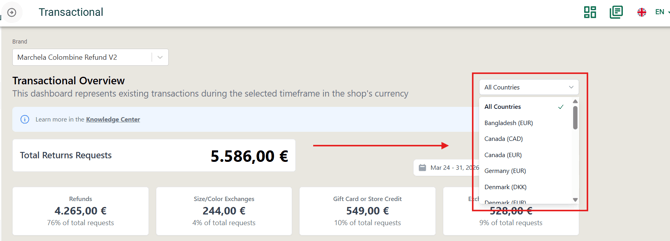
The analytics dashboard now follows a clear, automatic currency rule tied to the Country filter — removing ambiguity when viewing aggregated or country-specific data.
Examples:
- All Countries → €
- United Kingdom → £
- United States → $
- France → €
Behavior Details:
- Default state: Dashboard loads with "All Countries" selected and EUR as the display currency.
- Switching to a country: Data and currency automatically update to that country's local currency. All KPI tiles, charts, drilldowns, and exports reflect the change.
- Switching back to All Countries: Display currency resets to EUR regardless of previous selection.
- Country selection persists when changing date range or exporting, but resets when switching brand entity.
2. Transaction Export — New Currency & Base Value Fields
What's Changed:
-
The transaction export report now includes six additional fields to support cross-currency analysis and financial reconciliation.
New Export Fields:
| Field | Description |
|---|---|
currency_code |
Currency of the original transaction |
refund_type |
Type of refund applied |
base_price |
Transaction price in the base reporting currency |
discount |
Discount applied in the original transaction currency |
base_discount |
Discount amount in the base reporting currency |
base_currency |
Base currency used for internal reporting and calculations |
Personalized Emails — Logo & Footer Bug Fix
What's Changed:
-
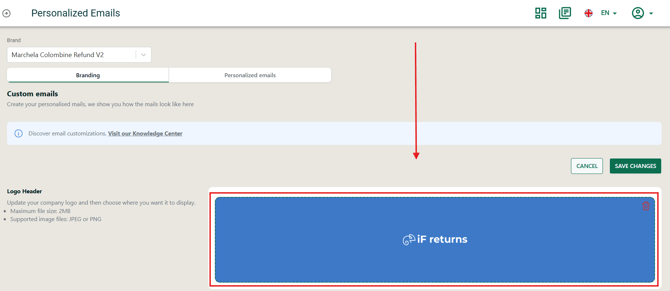
Two bugs affecting personalized email configuration have been resolved. Merchants can now upload a logo and save a footer message without errors.
What's Fixed:
Logo upload
-
Merchant users can now upload a logo without errors.
-
The uploaded logo saves correctly and is reflected in the personalized email preview.
Footer message
-
Merchant users can now add a footer in any language and save it without errors.
-
The footer saves correctly regardless of which language tab is active.
-
The saved footer is reflected in the personalized email preview.

Email Notifications — Correct Price Display for Discounted Items
What's Changed:
-
The order summary in return email notifications now correctly shows the amount the customer actually paid for each item, rather than the full list price.
What's Fixed:
-
Each item in the summary now reflects the amount paid, not the list price.
-
When only some items in an order have discounts, each item reflects its own paid amount independently.
-
The total returned items sum correctly adds up the amounts paid across all returned items.
-
When no discounts are applied, behaviour is unchanged — the paid amount equals the full price.