![Logo Negativo-4.png]](https://help.ifreturns.com/hs-fs/hubfs/Logo%20Negativo-4.png?height=40&name=Logo%20Negativo-4.png)
General Configurations
-
General configurations apply across all pages.
What can be changed?
-
Primary color
-
Secondary color
-
Hide/Show FAQ message
-
Hide/Show FAQ icon
-
FAQ text color
-
FAQ icon color
-
Background color
-
Box shadow
-
Primary button text color
-
Secondary button text color
-
Title text color
-
Subtitle title color
To have more information of general configurations please visit this document -> CLICK HERE
Product Item Selector Page
-
It is a page where customers select items to return.
What can be changed?
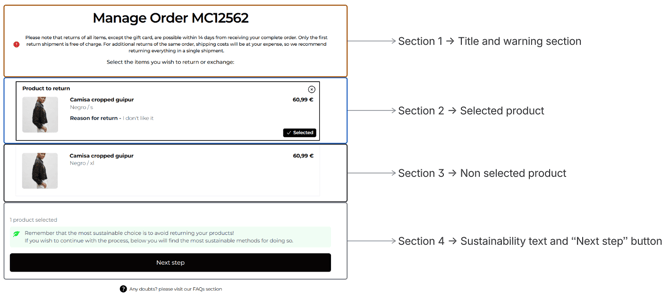
Section 1 → Title and warning section
Here are the name of the order, the instructions for the product section and alerts about politics of return that affect the return process
-
Background color
-
Warning text color
-
Warning text align
-
Warning text font
-
Hide/show warning icon
-
General title and subtitle text color configurations will apply in this section
Section 2 → Selected product
-
Background color of the container
-
Border color of the container
-
Border radius of the container
Section 3 → Non selected product
-
Background color of the container
-
Border color of the container
-
Border radius of the container
Section 4 → Sustainability text and “Next step” button
-
Hide/Show Sustainability message
-
Sustainability icon color
- Product counter text color
To have more information of productor item selector page please visit this document -> CLICK HERE
Refund Methods Page
-
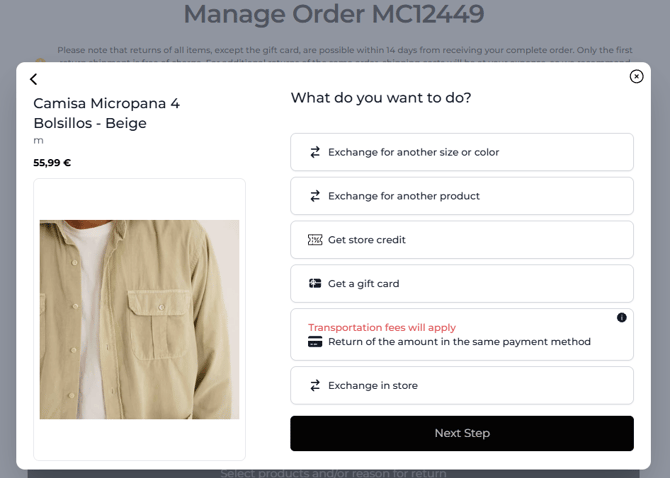
It is a page where customers select refund method
What can be changed?
-
Refund icon color
To have more information of refund methods page please visit this document -> CLICK HERE
Return Methods Page
-
It is a page where customers select return method
What can be changed?
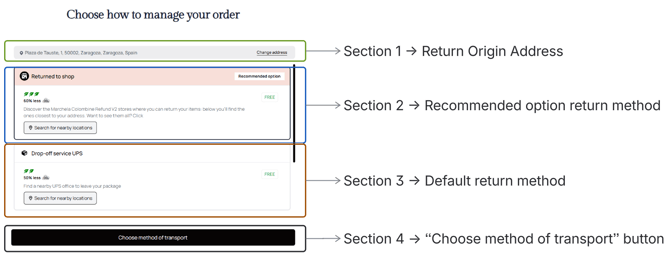
Section 1 → Return Origin Address
-
Background color
-
Address text color
-
“Change address” button
Section 2 → Recommended option return method
-
Header Background color
-
Icon color
-
Icon background color
-
“Recommended option” badge
Section 3 → Default return method
-
Icon color
-
Icon background color
-
“Free” tag. The change applies to all tags
Section 4 → “Choose method of transport” button
-
No configuration yet
To have more information of return methods page please visit this document -> CLICK HERE
Return Summary Page
- It is a page that summarizes all info before confirming and creating a return order.
What can be changed?
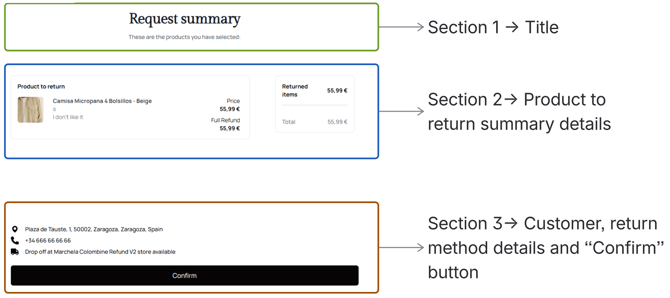
Section 1 → Title
-
General title and subtitle text color configurations will apply in this section
Section 2 → Product to return summary details
-
No configurations yet
Section 3 → Shipping details and “Confirm” button
-
Customer address text color
-
Customer phone number text color
-
Shipping method description text color
To have more information of return confirmation page please visit this document -> CLICK HERE
Return Completed Page
- It is a page that shows confirmation of return order and following information about the order.
What can be changed?
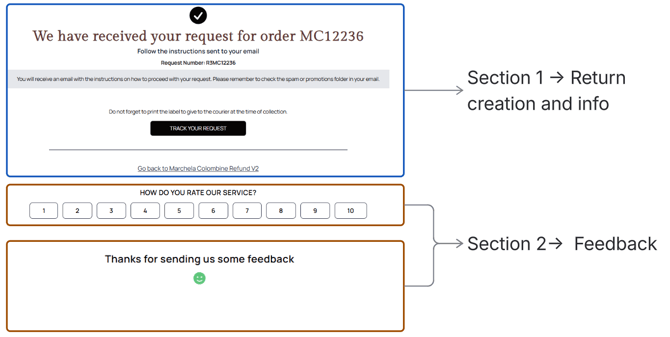
Section 1 → Return creation and info
-
Icon color
-
Title color
-
Request number color
-
Divider line color
-
Return to store URL text color
- Subtitle text color
Section 2 → Feedback
-
Text color
-
Show / hide icon
-
NPS question text color
-
NPS number border color
-
NPS number color
To have more information of return completed page please visit this document -> CLICK HERE
Tracking Order Page
- It is a page that shows tracking status of return order and shipping details.
What can be changed?
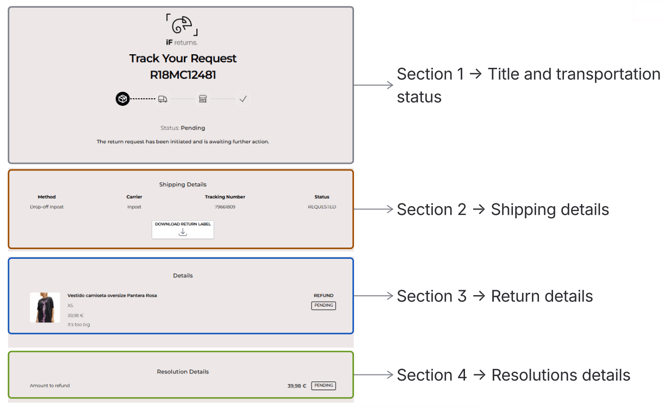
Section 1 → Title and transportation status
-
No configurations yet
Section 2 → Shipping details
-
Method title and Method description
-
Transport title and Transport description
-
Tracking number title and Tracking number description
-
Status title and Status description
-
Label button text color
-
Label button background color
-
Label button icon color
Section 3 → Return details
-
“Pending” tag background color
-
“Pending” tag text color
-
“Pending” tag border color
-
“Pending” tag border radius
Section 4 → Resolutions details
-
“Pending” tag background color
-
“Pending” tag text color
-
“Pending” tag border color
-
“Pending” tag border radius
To have more information of tracking order page please visit this document -> CLICK HERE