---
title: Release Notes 3.1.2 (22/04/2026)
description: Xr4
---
[Skip to content](https://help.ifreturns.com/en/knowledge-center/release-notes-3.1.2-22/04/2026#main-content)
- [English](https://help.ifreturns.com/en/knowledge-center/release-notes-3.1.2-22/04/2026)
- [Español](https://help.ifreturns.com/es/knowledge-center/release-notes-3.1.2-22/04/2026)
- [Italiano](https://help.ifreturns.com/it/knowledge-center/release-notes-3.1.2-22/04/2026)
English
Show submenu for translations
[Customer portal](https://help.ifreturns.com/tickets-view?hsLang=en)
![Logo Negativo-4.png\]](https://help.ifreturns.com/hs-fs/hubfs/Logo%20Negativo-4.png?height=40&name=Logo%20Negativo-4.png)
Open main navigation
Close main navigation
- - [English](https://help.ifreturns.com/en/knowledge-center/release-notes-3.1.2-22/04/2026)
- [Español](https://help.ifreturns.com/es/knowledge-center/release-notes-3.1.2-22/04/2026)
- [Italiano](https://help.ifreturns.com/it/knowledge-center/release-notes-3.1.2-22/04/2026)
English
Show submenu for translations
- [Customer portal](https://help.ifreturns.com/tickets-view)
- Go to ifreturns.com
Go to ifreturns.com
How can we help?
- There are no suggestions because the search field is empty.
1. [Knowledge Center](https://help.ifreturns.com/en/knowledge-center?hsLang=en)
2. [Releases Notes](https://help.ifreturns.com/en/knowledge-center/releases-notes?hsLang=en)
3. [Release Notes 3.1](https://help.ifreturns.com/en/knowledge-center/releases-notes?hsLang=en#release-notes-3-1)
# Release Notes 3.1.2 (22/04/2026)
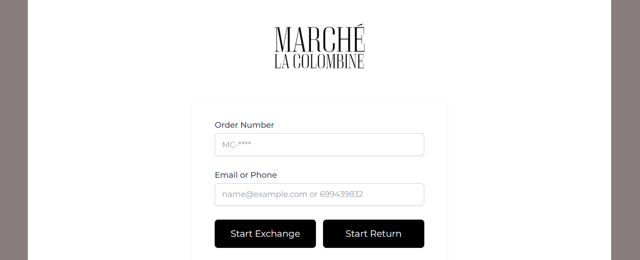
### **Split Return Portal: Separate Refund & Exchange Flows**
#### What's Changed:
- The return portal now offers two separate entry points — one for refunds and one for exchanges. Each link leads to a dedicated flow with restricted options, replacing the previous mixed-resolution experience.
#### What's New:
- Customers accessing the return policy page now see **two distinct links:**
| Link | Flow |
| --- | --- |
| Refund | Opens the portal in refund-only mode (OPM) |
| Exchange | Opens the portal in exchange-only mode |
#### Flow Details:
**Refund flow (via Refund link)**
- The available refund methods are **OPM** (Original Payment Method), **Gift Card** and **Store Credit**
- The customer can manage **as many products as they want** in a single return.
**Exchange flow (via Exchange link)**
- The only available resolution is **Exchange**.
#### URL Parameter Support:
- The portal flow can also be pre-selected via a URL parameter:
- requestType=return → opens the refund flow
- requestType=exchange → opens the exchange flow
- If both a URL parameter and a CTA selection are present, **the CTA selection takes priority**.
- **Missing parameter handling:** If the feature is enabled for a brand and no requestType is provided in the URL, the user is redirected to login and shown the following error:
> *"Incorrect order number or e-mail. Please contact us here, for assistance to complete your exchange or return."*
#### Flow Restriction:
- Each flow is strictly scoped — users cannot mix resolution types once a flow is entered:
| requestType | Available Options |
| --- | --- |
| return | Refund options only |
| exchange | Exchange options only |
#### Button Translations:
- All new CTA buttons (Refund and Exchange links) are fully translated across all languages available in the portal.
#### Activation:
This is an opt-in feature. To enable the split Refund & Exchange portal for your brand, please contact **iF Returns Customer Support**.
- [Inquiries or Incidents](https://help.ifreturns.com/en/knowledge-center/inquiries-or-incidents?hsLang=en)
- [Getting Started](https://help.ifreturns.com/en/knowledge-center/getting-started?hsLang=en#main-content)
- [Portal Overview](https://help.ifreturns.com/en/knowledge-center/getting-started?hsLang=en#portal-overview)
- [Analytics](https://help.ifreturns.com/en/knowledge-center/getting-started?hsLang=en#analytics)
- [In app configurations](https://help.ifreturns.com/en/knowledge-center/getting-started?hsLang=en#in-app-configurations)
- [Return Portal Configurations](https://help.ifreturns.com/en/knowledge-center/getting-started?hsLang=en#return-portal-configurations)
- [UX/UI Return Portal configurations](https://help.ifreturns.com/en/knowledge-center/getting-started?hsLang=en#ux-ui-return-portal-configurations)
- [Build your refund policy](https://help.ifreturns.com/en/knowledge-center/getting-started?hsLang=en#build-your-refund-policy)
- [Customizations](https://help.ifreturns.com/en/knowledge-center/getting-started?hsLang=en#customizations)
- [Promotions Management](https://help.ifreturns.com/en/knowledge-center/getting-started?hsLang=en#promotions-management)
- [Refund Processes](https://help.ifreturns.com/en/knowledge-center/refund-processes?hsLang=en#main-content)
- [Overview](https://help.ifreturns.com/en/knowledge-center/refund-processes?hsLang=en#overview)
- [Refunds Methods](https://help.ifreturns.com/en/knowledge-center/refund-processes?hsLang=en#refunds-methods)
- [Other configurations](https://help.ifreturns.com/en/knowledge-center/refund-processes?hsLang=en#other-configurations)
- [Returns Management](https://help.ifreturns.com/en/knowledge-center/returns-management?hsLang=en#main-content)
- [Day to Day Operations](https://help.ifreturns.com/en/knowledge-center/returns-management?hsLang=en#day-to-day-operations)
- [Return Methods](https://help.ifreturns.com/en/knowledge-center/returns-management?hsLang=en#return-methods)
- [Return Reasons](https://help.ifreturns.com/en/knowledge-center/returns-management?hsLang=en#return-reasons)
- [Return Policies](https://help.ifreturns.com/en/knowledge-center/returns-management?hsLang=en#return-policies)
- [Rules Settings](https://help.ifreturns.com/en/knowledge-center/rules-settings?hsLang=en#main-content)
- [General Information](https://help.ifreturns.com/en/knowledge-center/rules-settings?hsLang=en#general-information)
- [Actions](https://help.ifreturns.com/en/knowledge-center/rules-settings?hsLang=en#actions)
- [Conditions](https://help.ifreturns.com/en/knowledge-center/rules-settings?hsLang=en#conditions)
- [Operators](https://help.ifreturns.com/en/knowledge-center/rules-settings?hsLang=en#operators)
- [Most Common Rules](https://help.ifreturns.com/en/knowledge-center/rules-settings?hsLang=en#most-common-rules)
- [Shipping Integrations](https://help.ifreturns.com/en/knowledge-center/shipping-integrations?hsLang=en#main-content)
- [ShippyPro](https://help.ifreturns.com/en/knowledge-center/shipping-integrations?hsLang=en#shippypro)
- [Invoices / Documents](https://help.ifreturns.com/en/knowledge-center/invoices-documents?hsLang=en)
- [Releases Notes](https://help.ifreturns.com/en/knowledge-center/releases-notes?hsLang=en#main-content)
- [Release Notes 1.1](https://help.ifreturns.com/en/knowledge-center/releases-notes?hsLang=en#release-notes-1-1)
- [Release Notes 1.2](https://help.ifreturns.com/en/knowledge-center/releases-notes?hsLang=en#release-notes-1-2)
- [Release Notes 1.3](https://help.ifreturns.com/en/knowledge-center/releases-notes?hsLang=en#release-notes-1-3)
- [Release Notes 1.4](https://help.ifreturns.com/en/knowledge-center/releases-notes?hsLang=en#release-notes-1-4)
- [Release Notes 2.0](https://help.ifreturns.com/en/knowledge-center/releases-notes?hsLang=en#release-notes-2-0)
- [Release Notes 2.1](https://help.ifreturns.com/en/knowledge-center/releases-notes?hsLang=en#release-notes-2-1)
- [Release Notes 2.2](https://help.ifreturns.com/en/knowledge-center/releases-notes?hsLang=en#release-notes-2-2)
- [Release Notes 2.3](https://help.ifreturns.com/en/knowledge-center/releases-notes?hsLang=en#release-notes-2-3)
- [Release Notes 3.0](https://help.ifreturns.com/en/knowledge-center/releases-notes?hsLang=en#release-notes-3-0)
- [Release Notes 3.1](https://help.ifreturns.com/en/knowledge-center/releases-notes?hsLang=en#release-notes-3-1)
- [Release Notes 3.2](https://help.ifreturns.com/en/knowledge-center/releases-notes?hsLang=en#release-notes-3-2)
- [Release Notes 4.2](https://help.ifreturns.com/en/knowledge-center/releases-notes?hsLang=en#release-notes-4-2)
- [Release Notes 5.0](https://help.ifreturns.com/en/knowledge-center/releases-notes?hsLang=en#release-notes-5-0)
- [Frequently Asked Questions](https://help.ifreturns.com/en/knowledge-center/frequently-asked-questions?hsLang=en)
[](https://www.ifreturns.com/)
Knowledge center iF returns
Copyright © 2026, iF Returns