---
title: Release Notes 3.0.7 (11/02/2026)
description: Notes
---
[Skip to content](https://help.ifreturns.com/en/knowledge-center/release-notes-3.0.7-11/02/2026#main-content)
- [English](https://help.ifreturns.com/en/knowledge-center/release-notes-3.0.7-11/02/2026)
- [Español](https://help.ifreturns.com/es/knowledge-center/release-notes-3.0.7-11/02/2026)
- [Italiano](https://help.ifreturns.com/it/knowledge-center/release-notes-3.0.7-11/02/2026)
English
Show submenu for translations
[Customer portal](https://help.ifreturns.com/tickets-view?hsLang=en)
![Logo Negativo-4.png\]](https://help.ifreturns.com/hs-fs/hubfs/Logo%20Negativo-4.png?height=40&name=Logo%20Negativo-4.png)
Open main navigation
Close main navigation
- - [English](https://help.ifreturns.com/en/knowledge-center/release-notes-3.0.7-11/02/2026)
- [Español](https://help.ifreturns.com/es/knowledge-center/release-notes-3.0.7-11/02/2026)
- [Italiano](https://help.ifreturns.com/it/knowledge-center/release-notes-3.0.7-11/02/2026)
English
Show submenu for translations
- [Customer portal](https://help.ifreturns.com/tickets-view)
- Go to ifreturns.com
Go to ifreturns.com
How can we help?
- There are no suggestions because the search field is empty.
1. [Knowledge Center](https://help.ifreturns.com/en/knowledge-center?hsLang=en)
2. [Releases Notes](https://help.ifreturns.com/en/knowledge-center/releases-notes?hsLang=en)
3. [Release Notes 3.0](https://help.ifreturns.com/en/knowledge-center/releases-notes?hsLang=en#release-notes-3-0)
# Release Notes 3.0.7 (11/02/2026)
### **Changing text of disincentive of refund**
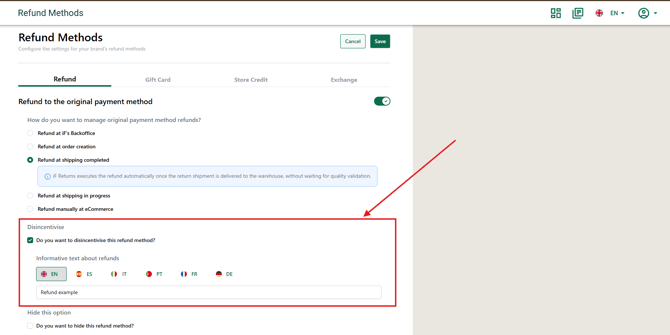
- Ability to configure and manage the refund disincentive text
- If no custom text is configured, a **default platform copy** is used.
- It is possible to customize text in any of available languages
- To change the text:
- Go to -\> Refund methods -\> select Refund
- Activate the Disincentive method by check boxing the icon and put a text you want
****
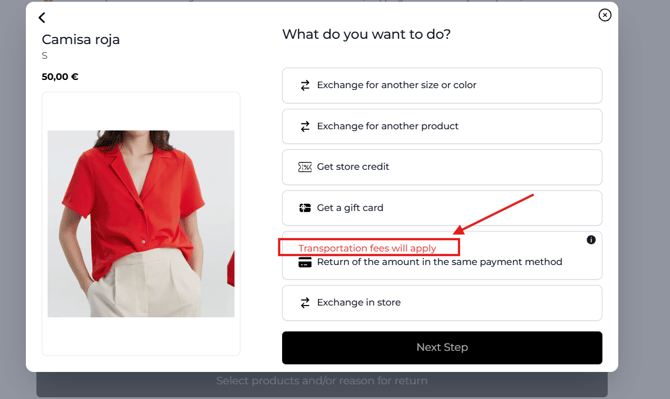
- The modified text appears above the refund method
### **Address validation on iF portal:**
Contact Customer Support team to know how to activate this configuration
- We have added a new configuration to validate a new address
- When a customer changes the address in the portal, the new address must be validated
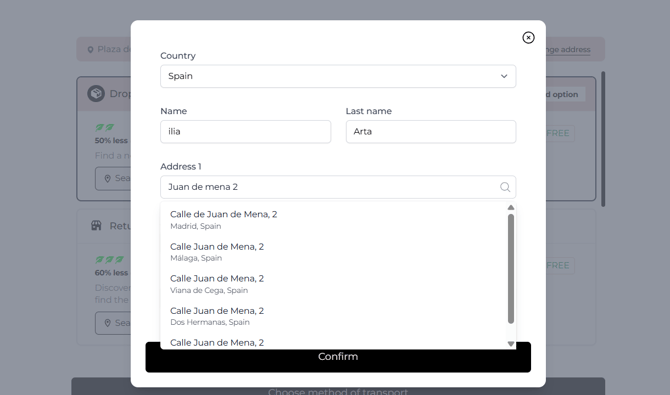
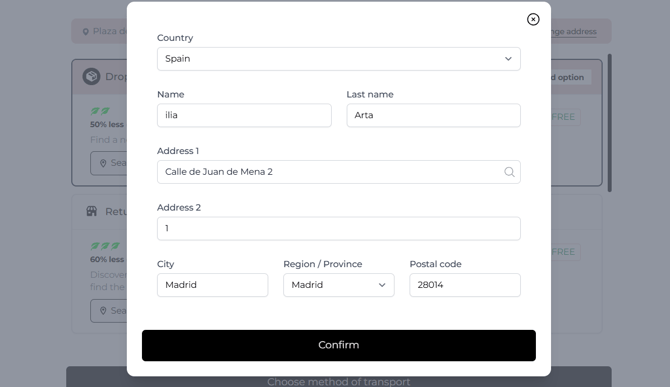
- When customers select the address the rest of fields will fill automatically
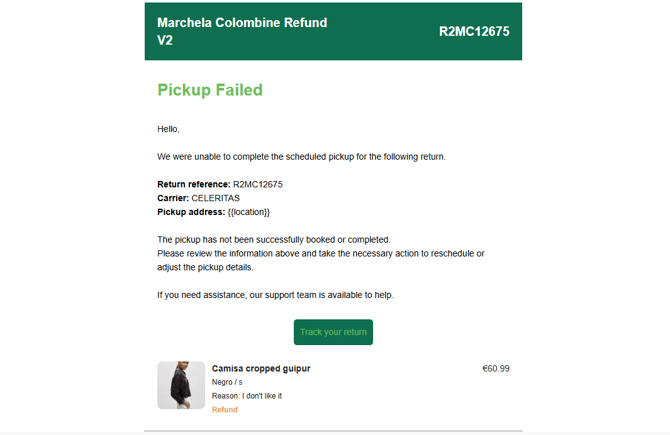
### **New email template when ShippyPro pickup has failed.**
- We have added a new template when Pick-up is failed
- The email includes:
- Return reference
- Pickup reference (if available)
- Carrier: ShippyPro
- Failure reason/message
- Pickup address and scheduled date (if available)
Contact Customer Support team to know how to activate this configuration
- [Inquiries or Incidents](https://help.ifreturns.com/en/knowledge-center/inquiries-or-incidents?hsLang=en)
- [Getting Started](https://help.ifreturns.com/en/knowledge-center/getting-started?hsLang=en#main-content)
- [Portal Overview](https://help.ifreturns.com/en/knowledge-center/getting-started?hsLang=en#portal-overview)
- [Analytics](https://help.ifreturns.com/en/knowledge-center/getting-started?hsLang=en#analytics)
- [In app configurations](https://help.ifreturns.com/en/knowledge-center/getting-started?hsLang=en#in-app-configurations)
- [Return Portal Configurations](https://help.ifreturns.com/en/knowledge-center/getting-started?hsLang=en#return-portal-configurations)
- [UX/UI Return Portal configurations](https://help.ifreturns.com/en/knowledge-center/getting-started?hsLang=en#ux-ui-return-portal-configurations)
- [Build your refund policy](https://help.ifreturns.com/en/knowledge-center/getting-started?hsLang=en#build-your-refund-policy)
- [Customizations](https://help.ifreturns.com/en/knowledge-center/getting-started?hsLang=en#customizations)
- [Promotions Management](https://help.ifreturns.com/en/knowledge-center/getting-started?hsLang=en#promotions-management)
- [Refund Processes](https://help.ifreturns.com/en/knowledge-center/refund-processes?hsLang=en#main-content)
- [Overview](https://help.ifreturns.com/en/knowledge-center/refund-processes?hsLang=en#overview)
- [Refunds Methods](https://help.ifreturns.com/en/knowledge-center/refund-processes?hsLang=en#refunds-methods)
- [Other configurations](https://help.ifreturns.com/en/knowledge-center/refund-processes?hsLang=en#other-configurations)
- [Returns Management](https://help.ifreturns.com/en/knowledge-center/returns-management?hsLang=en#main-content)
- [Day to Day Operations](https://help.ifreturns.com/en/knowledge-center/returns-management?hsLang=en#day-to-day-operations)
- [Return Methods](https://help.ifreturns.com/en/knowledge-center/returns-management?hsLang=en#return-methods)
- [Return Reasons](https://help.ifreturns.com/en/knowledge-center/returns-management?hsLang=en#return-reasons)
- [Return Policies](https://help.ifreturns.com/en/knowledge-center/returns-management?hsLang=en#return-policies)
- [Rules Settings](https://help.ifreturns.com/en/knowledge-center/rules-settings?hsLang=en#main-content)
- [General Information](https://help.ifreturns.com/en/knowledge-center/rules-settings?hsLang=en#general-information)
- [Actions](https://help.ifreturns.com/en/knowledge-center/rules-settings?hsLang=en#actions)
- [Conditions](https://help.ifreturns.com/en/knowledge-center/rules-settings?hsLang=en#conditions)
- [Operators](https://help.ifreturns.com/en/knowledge-center/rules-settings?hsLang=en#operators)
- [Most Common Rules](https://help.ifreturns.com/en/knowledge-center/rules-settings?hsLang=en#most-common-rules)
- [Shipping Integrations](https://help.ifreturns.com/en/knowledge-center/shipping-integrations?hsLang=en#main-content)
- [ShippyPro](https://help.ifreturns.com/en/knowledge-center/shipping-integrations?hsLang=en#shippypro)
- [Invoices / Documents](https://help.ifreturns.com/en/knowledge-center/invoices-documents?hsLang=en)
- [Releases Notes](https://help.ifreturns.com/en/knowledge-center/releases-notes?hsLang=en#main-content)
- [Release Notes 1.1](https://help.ifreturns.com/en/knowledge-center/releases-notes?hsLang=en#release-notes-1-1)
- [Release Notes 1.2](https://help.ifreturns.com/en/knowledge-center/releases-notes?hsLang=en#release-notes-1-2)
- [Release Notes 1.3](https://help.ifreturns.com/en/knowledge-center/releases-notes?hsLang=en#release-notes-1-3)
- [Release Notes 1.4](https://help.ifreturns.com/en/knowledge-center/releases-notes?hsLang=en#release-notes-1-4)
- [Release Notes 2.0](https://help.ifreturns.com/en/knowledge-center/releases-notes?hsLang=en#release-notes-2-0)
- [Release Notes 2.1](https://help.ifreturns.com/en/knowledge-center/releases-notes?hsLang=en#release-notes-2-1)
- [Release Notes 2.2](https://help.ifreturns.com/en/knowledge-center/releases-notes?hsLang=en#release-notes-2-2)
- [Release Notes 2.3](https://help.ifreturns.com/en/knowledge-center/releases-notes?hsLang=en#release-notes-2-3)
- [Release Notes 3.0](https://help.ifreturns.com/en/knowledge-center/releases-notes?hsLang=en#release-notes-3-0)
- [Release Notes 3.1](https://help.ifreturns.com/en/knowledge-center/releases-notes?hsLang=en#release-notes-3-1)
- [Release Notes 3.2](https://help.ifreturns.com/en/knowledge-center/releases-notes?hsLang=en#release-notes-3-2)
- [Release Notes 4.2](https://help.ifreturns.com/en/knowledge-center/releases-notes?hsLang=en#release-notes-4-2)
- [Release Notes 5.0](https://help.ifreturns.com/en/knowledge-center/releases-notes?hsLang=en#release-notes-5-0)
- [Frequently Asked Questions](https://help.ifreturns.com/en/knowledge-center/frequently-asked-questions?hsLang=en)
[](https://www.ifreturns.com/)
Knowledge center iF returns
Copyright © 2026, iF Returns